
Multi-location brands have a lot to manage, with the need to maintain consistent branding, accurate information, and marketing that converts across locations.
In this blog, Connor McCaslin, Director of Strategic Partnerships, will look at how to build a truly connected marketing technology stack that works for these business models and maximizes performance.
Expert Insight Into Marketing Tech Stacks for Multi-Location Brands
As businesses expand to new locations, they need to tie all of the data together into a cohesive marketing strategy that works at the overarching brand and local levels.
To enable this, multi-location brands need full stack marketing solutions that can maintain manageable workflows while providing the insights needed to continually perfect strategies. A solid marketing tech stack will include tools that can manage all relevant channels and provide real-time data that businesses can turn into meaningful actions.
With the right marketing technologies stack, including Rallio, Ignite Visibility has helped numerous multi-location brands realize their potential. One brand was able to see a 150% click-through rate increase and a 21% lower cost per lead with the help of refined geo-targeting and ad testing, while another observed a 75% boost in booked appointments thanks to a fully optimized local SEO strategy.
Knowing what to include in your marketing technology stack can make all the difference, so let’s get into how to put together your system.
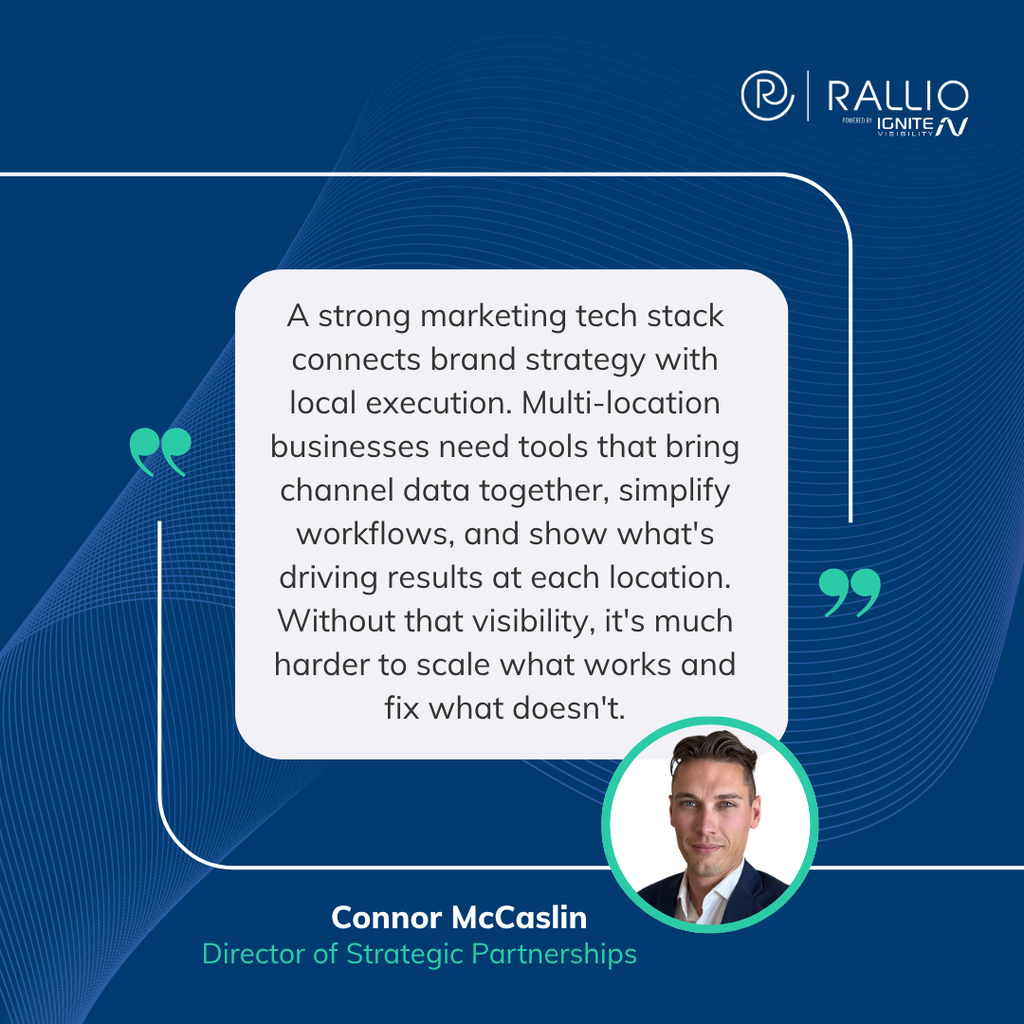
Build Around the Customer Journey and Each Location’s Results
To start with, a go-to-market tech stack must be able to connect all location data, customer records, marketing channels, and sales outcomes through shared identifiers, with clear responsibilities and reliable real-time data exchange.
Many multi-location brands suffer from one central problem due to the lack of multi-location marketing integration: While corporate sees overall campaign results, local teams manage the actual customer conversations, and neither can consistently connect marketing activity to completed sales.
For example, an HVAC franchise might have an inquiry move from an ad or local search to a call center, which leads them to a specific branch, a booked appointment, and eventually a completed job with follow-up. Corporate might see the end result with the existing multi-location marketing stack, but not the journey the customer took from initial interaction to follow-up.
To determine where the process succeeded, this brand might ask questions like:
- Which location received the lead?
- Who responded to the inquiry?
- Did that inquiry become a customer?
- What should marketing change to make the transition smoother?
A connected marketing stack will be able to help answer all of these.
Audit Where Your Current Marketing Tech Stack Loses Information
To identify any gaps in your marketing technologies stack, inventory all of your tools for:
- Websites
- Local listings
- Social media
- Reviews
- Paid media
- Call tracking
- CRM
- Booking/POS
- Email/SMS
- Reporting
For every tool, document its specific:
- Purpose
- Owner
- Cost
- Location coverage
- Data inputs/outputs
- Integrations
- Actual usage
During testing, trace several real inquiries across all systems, and look for issues like missing location IDs, duplicate records, manual exports, unassigned leads, and sales outcomes that fail to tie back to marketing.
Depending on the circumstances, your marketing technology stack might suffer from one or more of the following key issues:
- Missing functionality
- Disconnected systems
- Unclear team responsibilities
Each problem will require a different fix.
Here’s a simple worksheet to help you determine what to do based on your audit:
| Action | When to Do It |
| Keep | Tools have high adoption, clear ROI, and a named owner |
| Connect | The tool might work well locally but forms a data silo |
| Consolidate | Two or more brands use different tools to complete the same task, creating duplicate or disparate processes |
| Retire | Tools experience low utilization, have duplicate features, or fail to tie to a particular metric |
Prioritize any breaks affecting customer response and revenue before making any cosmetic improvements to dashboards.
Give Every Location a Consistent Identity Across Systems
The best martech stack needs every location to be consistent throughout the entire system. Here are some ways to facilitate this cohesion:
- Create a stable internal location ID that’s mapped to each system’s identifiers, including your Google Business Profile, CRM branch, booking/POS location, call-tracking destination, and advertising/reporting labels.
- Define the core location record for your brand, each owner/franchisee, address or service area, time zone, hours, services, local URLs, phone numbers, and operating status.
- Distinguish customer identities from location identities, as one customer might interact with multiple branches, making it important to preserve the originating location and the location that’s actually converting the lead.
- Assign an authoritative source for each field; while your CRM may indicate customer status, the booking system will own the appointment status, and the location database may contain opening hours.
- Establish rules for openings, relocations, closures, acquisitions, and ownership changes for all locations, and avoid treating renamed locations as entirely new businesses in historical data reports.
Connect the Essential Layers Before Adding More Software
Your marketing technologies stack architecture will consist of five key layers:
| Layer | What It Covers |
| Location Information | Name, address, and phone number (NAP)Service and offering lists |
| Discovery and Engagement | ListingsLocal pagesSEOSocial mediaReviewsPaid media |
| Lead/Customer Operations | CRMCall handlingBookingsPOSLifecycle messaging |
| Integration and Automation | Data definitions across systemsAutomated partner portal loginsSynced local transactions with corporate platformsIdentity access for regional owners |
| Measurement and Activation | Performance data by location or regionLoyalty program segmentsFoot-traffic attributionBrand compliance tracking |
Different key information must pass across layers, including location ID, campaign/source, lead ID, status, timestamps, consent preferences, and transaction outcomes when needed.
Actions could also work bidirectionally, i.e., customer outcomes could inform marketing decisions, or marketing activity and context could enable local teams to respond more effectively.
And while native integrations may be sufficient in some cases, such as connecting identical data structures across locations between HubSpot CRM and Google Ads, you may need third-party integration software or data warehouses if data becomes too complex in a B2C or B2B marketing tech stack.
Set Clear Rules for Corporate, Franchisees, Agencies, and Vendors
Responsibilities will vary at different layers:
| Entity | Responsibilities |
| Corporate | Establishing and maintaining shared definitions and brand standards |
| Local Teams | Validating operational details and handling assigned inquiries |
| Agencies | Managing agreed campaign work |
| Technical Owner | Maintains connections across systems and locations |
For every workflow, name a single accountable owner to take on those responsibilities, along with a response deadline and an escalation path to resolve issues as they come along.
Systems will also work differently for corporate-owned chains, franchise systems, and acquired brands, with franchisee access, data sharing arrangements, and local budgets requiring explicit agreement at each level.
Additionally, determine who controls domains, profiles, ad accounts, customer records, integrations, and data exports when agencies or franchisees leave, ensuring data and workflows stay intact during the transition.
Depending on the situation, you may also want to decide whether to go with agency strategy or a marketing platform. An agency can help with strategic judgment, creative design, and omnichannel marketing, while platform execution can help maintain consistency across locations through reviews, listings, and other tasks.
Often, the best option is both, with the right agency selection making strategic recommendations while a platform executes those recommended implementations.
Connect Local Listings, Social Content, and Reputation Workflows
Whenever a brand makes an approved location change, that change should be reflected on the website, local listings, campaign destinations, and customer-facing communications through supported connections or assigned tasks.
Taking the above HVAC franchise example, the brand might want to change its business hours for a few locations, which should appear on local pages, all listings for those locations, and social media profiles, along with scheduling platforms and other communications when people book a service.
The corporate-to-local content workflow will look something like:
- Corporate determines the approved asset.
- This change applies to local details.
- A review occurs when required.
- New details publish.
- Location-level reporting reflects potential changes to customer interactions.
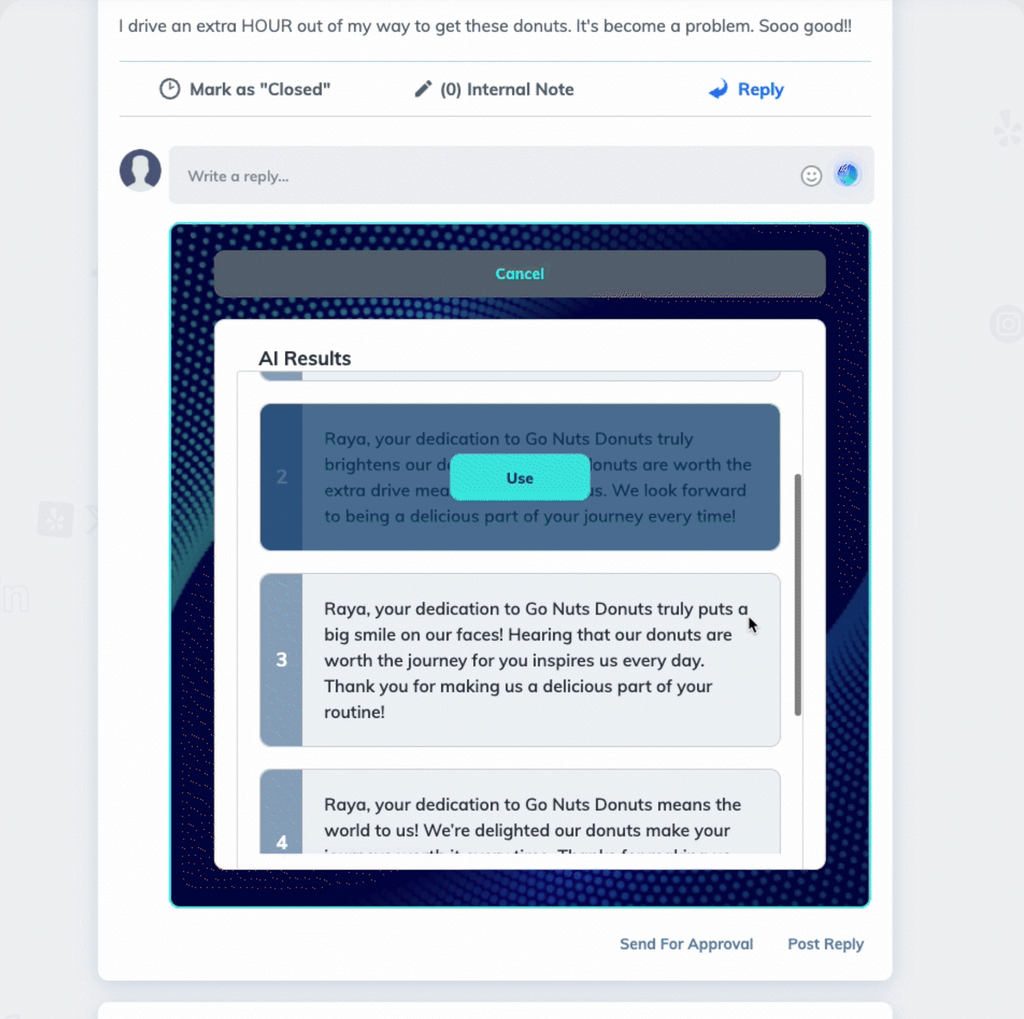
Route customer feedback to the team for resolution. If you observe recurring complaints about availability or service, those complaints should inform operations and campaign messaging.
If compatible with your CRM, Rallio’s multi-location publishing capability can help with this, assisting with local customization, approvals, review workflows, and reporting.
Make Lead Handoffs Visible From Inquiry to Completed Sale
Coming back to the HVAC franchise, lead handoff may look like:
- An inquiry arrives for heating system repair.
- Routing rules identify the location tied to the inquiry.
- An owner accepts responsibility.
- The system logs a contact attempt.
- Appointment/job status updates enter the system.
- The outcome returns to reporting.
To facilitate smooth lead handoff, start by requiring a lead ID, assigned location, owner, status, and timestamps. From there, determine what happens when a location rejects a lead, misses its response deadline, or is unable to serve the customer.
Address items like:
- After-hours inquiries
- Overlapping territories
- Call center transfers
- Duplicate submissions
- Customer switching branches
For instance, corporate might track the percentage of leads that don’t have an owner, as well as the time from inquiry to first response. The target percentage should be a proposed business standard rather than an industry benchmark, as every business and location will have different realistic goals, depending on factors like business size, local competition, and service need.
In your marketing tech stack, dashboards may expose a failed handoff, but your specific CRM rules and team responsibilities must resolve these failures. When identifying where handoff failed, avoid attributing lead-routing capabilities to attribution products without documentation.
Feed Qualified Leads and Revenue Back Into Paid Media
Full stack marketing must also be able to maintain a reliable feedback loop that could work like the following:
- Campaign
- Inquiry
- Qualified lead
- Appointment
- Completed sale
- Eligible conversion signals returned to advertising platforms
Each outcome should have a consistent definition across locations, with distinct outcomes possibly including booking value, completed revenue, cancellations, refunds, and gross margins.
You’ll also need to know how the following concepts factor into paid media:
- Matching: The process of linking a specific action taken to a user on the platform, e.g., when a customer books an appointment on your website.
- Deduplication: Prevents ad platforms from counting the same conversion event more than once.
- Upload Timing: Gauges how quickly conversion data transfers from servers to the ad network, ideally sending events in real time.
- Conversion Diagnostics: The troubleshooting dashboard in your ad account that monitors data feed health.
If you’re using Google Ads, Google made its Data Manager API openly available to all users on December 9, 2025. This feature supports first-party audience and offline conversion data connections, making it easier to not only avoid relying on third-party data but also to attribute offline conversions to online interactions across the customer journey.
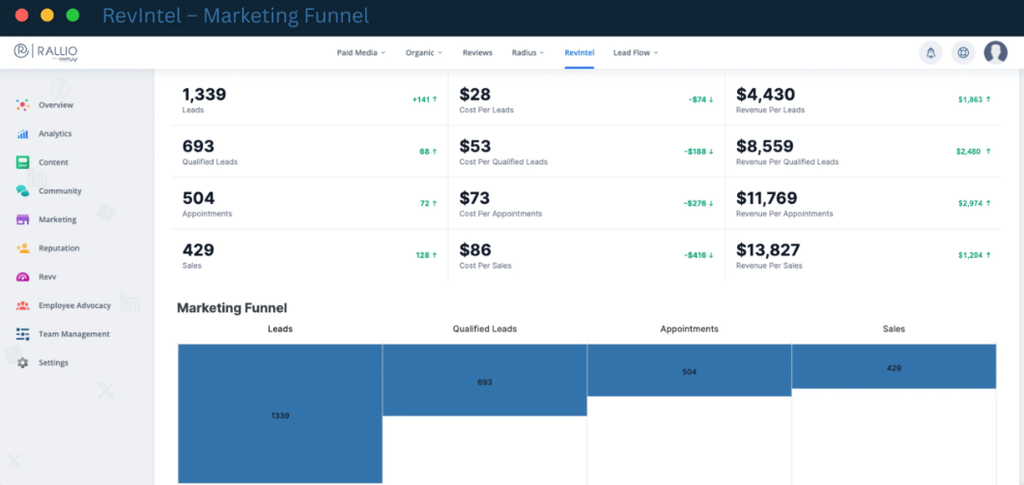
Want to connect CRM outcomes with your Google and Microsoft Ads? RevIntel can help with this as Ignite’s paid media optimization solution, though you will need to scope for compatibility, field mapping, and sales stages to get the most from this platform.
Connect Follow-Up and Retention to Actual Customer Status
Toward the bottom of the funnel, several conversion events may take place.
For instance, that HVAC company might have a lifecycle that involves the following stages:
- An unbooked inquiry enters the follow-up process.
- A booked appointment receives reminders.
- A completed job triggers an appropriate review request.
- A returning customer receives relevant reactivation messaging.
When connecting these events to customer statuses, eliminate any conflicting automations by suppressing prospect campaigns after purchase. Also, don’t send duplicate messages between corporate and location-level interactions.
Connected tools should receive communication preferences and opt-outs, and you must assign responsibility for updating them and propagation verification when testing.
Remember, follow-up and retention will look different for various industries, e.g., appointment-led services, recurring memberships, and retail or POS transactions come with varying triggers.
One overlooked benefit of connecting follow-up and retention to customer status is the ability to cut down on wasted follow-up, leading to overall improved customer experiences, whether before or after media performance changes.
Verify Integrations With Real Workflows, Not Vendor Logos
When engaging in martech stack optimization with new integrations, ask the following five questions:
- Which records and fields move?
- In which direction did they move?
- How quickly did they move?
- What happens when systems disagree?
- Who fixes failures?
Be sure to compare native integrations, separate integration platforms, and custom APIs based on maintenance, monitoring, and total cost of integration and operation instead of relying on connection availability.
Whether building autonomous AI marketing agent technical stacks or seeking other solutions, request a demonstration using sample location records, a new customer inquiry, an updated sales outcome, and an opt-out, with acceptance testing that looks for duplicate records and failed syncing.
Document critical items like:
- Field mappings
- Authoritative systems
- Retry rules
- Alerts
- Safe recovery processes
In the process, ensure importing historical data won’t result in accidental customer message triggers.
HubSpot data sync is one solution that can help with sync direction, matching, and conflict resolution settings. This feature allows HubSpot users to maintain data consistency between HubSpot and other connected apps, with both one-way and two-way syncing available for automatic record updating.
Just remember that “two-way integration” doesn’t equal instant or even safe updating in both systems, so double-check the results before accepting integrations.
Add AI Where Connected Data Can Support Reliable Decisions
Building autonomous AI marketing agent technical stacks could be the right move for certain tasks.
Some examples of where AI can help include:
- Drafting approved local content
- Review summarization
- Missing field identification
- Stalled lead flagging
- Location performance summary preparation
While AI can be great for automating more menial, repetitive tasks, there are some instances when human review is crucial, such as:
- Providing sensitive customer replies
- Assessing major budget changes
- Making changes to business information
For all automated actions, you’ll need to set clear access limits and logs. And remember that AI can’t reliably compare locations with differing qualification rules, sales stages, or location identifiers.
Another key consideration is data integration into AI platforms, as MuleSoft’s 2026 research concluded, with 96% of respondents in a survey of 1,050 enterprise IT leaders agreeing that AI agent success relies significantly on seamless data integration.
This importance highlights the necessity for fixing data and ownership gaps prior to expanding AI automation across systems.
Measure Whether the Stack Is Improving Location-Level Performance
For continual martech stack optimization, you need insight into how your integrations are performing at the local level.
When gauging performance, separate operational metrics from specific business outcomes.
Metrics might include:
- Data completeness
- Sync failures
- Response time
- Local adoption
Meanwhile, outcomes could look like:
- Qualified leads
- Booked appointments
- Completed sales
- Acquisition cost
- Retention
Further separate data into national, regional, and individual location views in your dashboard. When reviewing the data, remember to compare similar locations and keep new openings or closures separate from existing, established locations.
You may see instances of aggregate growth that look reassuring on the surface, but this can be misleading, as new locations could show a total revenue lift, even if existing branches are losing conversion efficiency.
In addition, know that attribution assigns credit using a specific model, meaning it doesn’t demonstrate incremental impact on its own. As such, it helps to use phased rollout or comparable pilot locations in some cases.
One of our franchise clients using RevIntel for its particular program saw an impressive 32.73% year-over-year increase in revenue and an 11.15% decrease in cost per qualified lead.
Roll Out the Connected Stack in Manageable Phases
As mentioned above, a phased rollout of a B2C or B2B marketing tech stack is often best. In fact, we consider it one of the best enterprise marketing tech stack recommendations for omnichannel management to ensure everything works the way it should upon integration.
Here’s how the rollout phases could look in a 90-day plan, which you can adapt to your needs:
| Period | Actions |
| Days 1-30 | Audit systemsDefine identifiers and ownersEstablish baselines |
| Days 31-60 | Connect one high-value workflow across representative locations |
| Days 61-90 | Validate resultsTrain usersExpand selectively |
In your plan, carefully select pilot locations with varying operating conditions, including a minimum of one with more data clutter or weaker adoption.
Before officially releasing the integration, look for criteria like:
- Records reconcile for consistency and accuracy
- Routing works effectively
- Failed syncs generate alerts
- Outcome reporting is usable
- Local staff can complete all assigned tasks
If you want to let go of any overlapping tools, only do so once you’ve verified all exports, dependencies, and replacement workflows to prevent discrepancies. Your budget also needs to cover support, training, and integration maintenance for a successful rollout.
Finally, during rollout, map a single customer journey and repair its most expensive handoff first, which will help you make similar journeys more cost-effective early on following integration.
Connect With Ignite Visibility and Rallio to Optimize Your Marketing Tech Stack
Want to get the best results from a go-to-market tech stack? Both Rallio and Ignite Visibility can help.
Ignite Visibility’s multi-location marketing services can provide you with everything from strategy and execution for newer multi-location brands to enterprise marketing tech stack recommendations for omnichannel management.
You can also use the Rallio agency selection scorecard to evaluate implementation partners to help you successfully integrate the best martech stack.
