
Social media is a visual-first world. Before anyone reads your caption, they see your image. And if that image is blurry, cropped weird, or stretched out of proportion, you’ve already lost them.
Getting your social media image sizes right is one of the simplest ways to look more professional online. In this blog, Olivia Reck, Account Manager, will break it all down so you always know what to post, where, and in what size.
What You’ll Learn:
- Why Social Media Image Sizes Matter
- Standard Image Sizes that Work Everywhere
- Platform Differences
- Best Practices for Social Media Images
- Scaling Across Multiple Locations
- How Rallio Can Help You Manage Your Social Media
- FAQs
Expert Opinion on Why Social Media Image Dimensions Matter
Before you start designing images for social media, it’s critical to know the correct image sizes you need for your chosen platform. Using wrong dimensions can hurt reach, engagement, and brand consistency all at once. That is a big deal, especially if you are managing multiple locations or accounts.
Your image presentation matters just as much as the content. With more than 80% of social media traffic coming from mobile devices, it’s important to ensure your images meet the platform’s dimension requirements while still looking sharp on a small screen.
Just remember: when your content fits the feed cleanly, people stop scrolling and start engaging. And that’s an impact worth doing some research for.
Why Social Media Image Sizes Matter
Before we get into each specific platform’s image requirements, let’s take a look at why they matter in the first place.
The size of your content plays a role in:
- How your content appears: Every platform has its own rules for how images display. Upload the wrong size, and your image gets stretched, squished, or cropped in all the wrong places. When this happens, users notice. And when users notice that your content looks off, they trust you a little less.
- The level of engagement you’ll receive: Sharp, well-sized images fill the feed cleanly, look intentional, and make people more likely to stop and interact. Sloppy visuals, on the other hand, send the opposite message. If your social media image dimensions are off, even great content can underperform.
- Cropping and quality issues: Platforms like Instagram and Facebook automatically crop images that do not fit their supported aspect ratios. That means your carefully designed graphic could lose its headline, your face, or your call to action. Using the right image specs future-proofs your content and means less rework when platforms update their layouts.
Standard Image Sizes that Work Everywhere
Before diving into platform specifics, it helps to know the three core formats you’ll find on social media: square, portrait, and vertical.
Square (1:1)
The square format at 1080 x 1080 pixels is the classic workhorse of social media. It works on Instagram, Facebook, LinkedIn, and X. It is balanced, easy to design, and takes up solid real estate in the feed. If you only have one version of an image, make it square.
Portrait (4:5)
The portrait format at 1080 x 1350 pixels is the sweet spot for mobile feeds. It takes up more vertical space than a square, giving your content more screen time. Use this when you want maximum visibility.
Vertical (9:16)
The vertical format at 1080 x 1920 pixels is built for Stories, Reels, and TikTok. It fills the entire phone screen, making it the most immersive option available. Keep key elements centered and away from the top and bottom edges to avoid being covered by platform UI.
Platform Differences
Each platform has its own preferred social media image sizes. Here is what you need to know for each one.
Instagram: Mobile-First, Vertical Focus
Built for mobile and vertical content, your Instagram photo sizes should stick to:
- Feed posts: 1080 x 1080 pixels (square) or 1080 x 1350 (portrait)
- Stories and Reels: 1080 x 1920 pixels
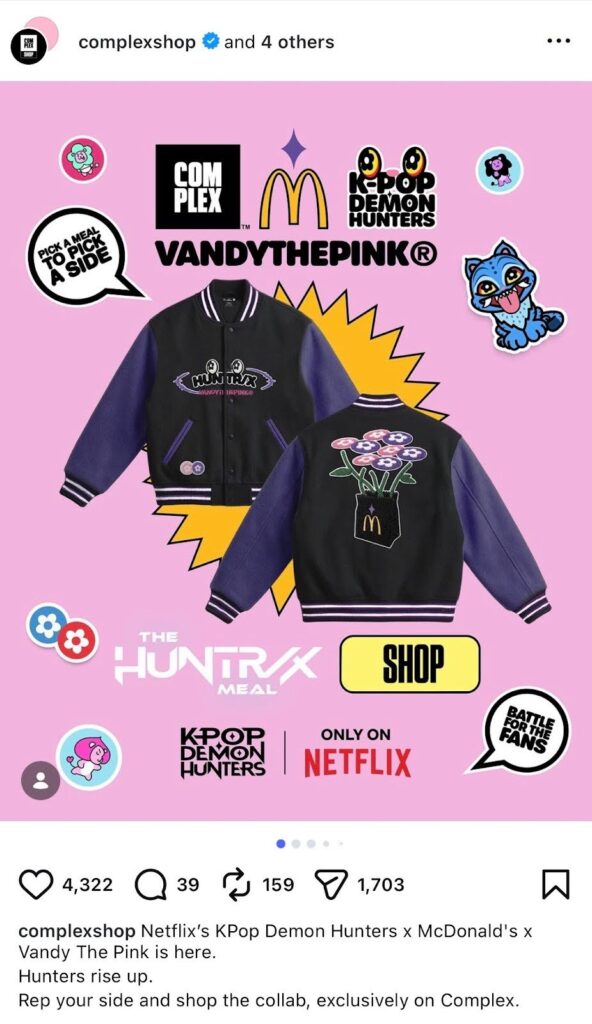
Instagram updated its grid in 2025 to display in a vertical 3:4 format, so keep important content centered in your frame. Your Instagram image size choices directly affect how your grid looks to new visitors.
Facebook: Mixed Formats
Facebook audiences use both mobile and desktop, so your Facebook image sizes need to hold up on both.
- Feed posts: 1080 x 1080 (square) or 1080 x 1350 (vertical)
- Cover photos: 851 x 315 pixels
- Stories: 1080 x 1920 pixels

Facebook profile pictures display at different sizes on desktop vs. mobile, so center your logo or face to avoid important information getting cut off.
LinkedIn: Professional, Landscape-Friendly
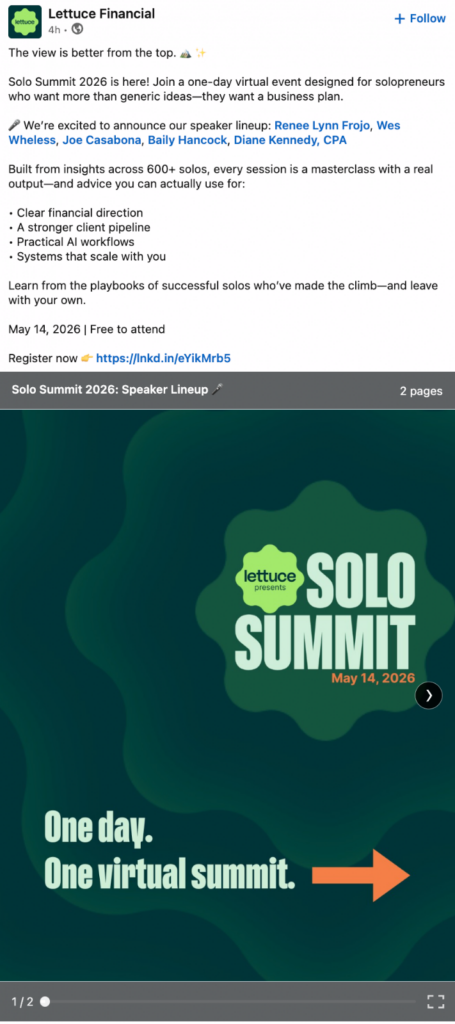
LinkedIn is where professional impressions are made. Follow these LinkedIn post image sizes:
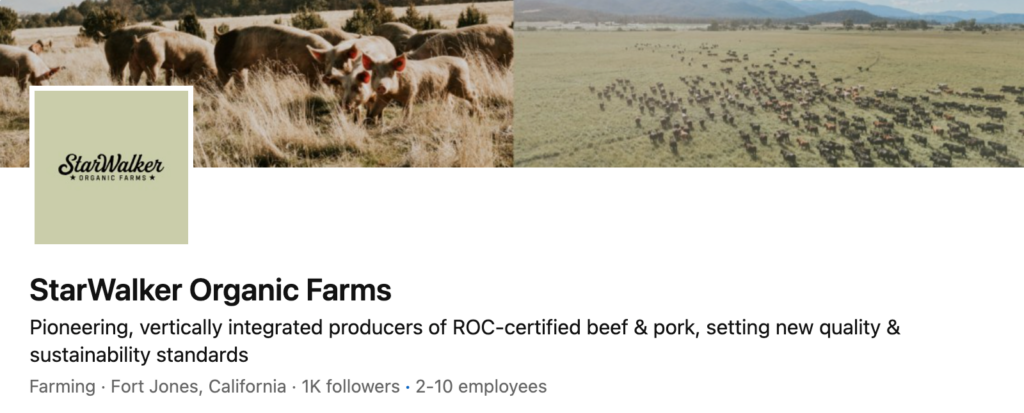
- Feed posts: 1200 x 1200 pixels (square) or 1200 x 627 pixels (landscape)
- Profile photos: 400 x 400 pixels
- Company cover image: 1128 x 191 pixels
- Vertical ads: 720 x 900 pixels for mobile placements
TikTok: Vertical-First
TikTok is all vertical, all the time. The standard format is 1080 x 1920 pixels at a 9:16 ratio. Post anything in a horizontal orientation, and you will get black bars — not a great look.

TikTok is also a mobile-heavy platform, so always design with mobile in mind from the very first click.
Pinterest: Tall Images Perform Best
Pinterest rewards tall, eye-catching images. The best-performing format is 1000 x 1500 pixels at a 2:3 ratio.
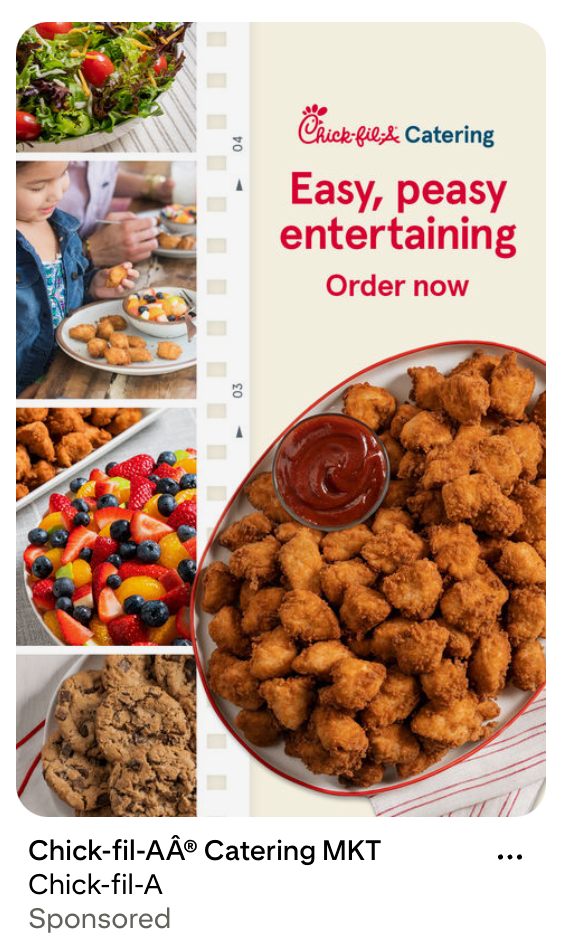
Pins with this ratio take up more vertical feed space, which leads to more saves and clicks. If you add a text overlay, it should be large enough to read and placed within the safe zone to avoid cropping.
X (Twitter): In-Feed Images
X supports both landscape and square formats for in-feed images.
- Landscape: 1600 x 900 pixels
- Square: 1080 x 1080 pixels
- Profile photos: 400 x 400 pixels
- Header images: 1500 x 500 pixels

An important thing to remember about Twitter image sizes is that, depending on the browser, up to 60 pixels can be cropped from the top and bottom of headers, so keep key content centered.
Best Practices for Social Media Images
Understanding your platforms is half the battle. The other half is applying a few smart design habits that make your images look great everywhere.
Here are some best practices to keep in mind when working with the sizes of social media images.
- Design for mobile viewing: Most people are scrolling on their phones. That means your image needs to look perfect on a 6-inch screen. Start with mobile-first dimensions like 4:5 or 9:16, then check how it looks on larger displays.
- Keep key content centered: Logos, faces, text, and calls to action near the edges are at risk of being cut off. Keep your most important elements centered in the frame and respect each platform’s safe zone guidelines. This simple habit prevents the most common image cropping mistakes.
- Use high-quality visuals: Resolution matters. Blurry or pixelated images make your brand look unprofessional, no matter how good your caption is. Always upload at the recommended pixel sizes, use PNG for graphics and text-heavy images, and use JPG for photos.
Scaling Across Multiple Locations
For multi-location brands, getting social media photo sizes right becomes even more important. One blurry logo or a cropped headline can undermine the entire brand experience across dozens of markets.
As you scale your social media strategy across multiple locations, keep these three things in mind:
- Consistency Is Key: When every location posts the same size images in the same formats, your brand looks unified. Customers who follow multiple locations of your brand should have a seamless visual experience. Inconsistent image sizes across locations signal a lack of organization, even if the content itself is great.
- Brand Guidelines Simplify Workflows: When your team works from the same brand guidelines, the guesswork disappears. Designers know what to build. Content managers know what to upload. And nothing gets rejected because it was the wrong size.
- Centralized Tools Make Everything Easier: Multi-location brands need tools that keep everyone working from the same playbook. Centralized platforms let you store approved image templates, ensure the right sizes are always used, and prevent rogue locations from using off-brand visuals.
How Rallio Can Help You Manage Your Social Media
Managing social media image sizes across multiple locations is a real challenge. Rallio is built to make it easier.
Our platform simplifies content creation, so your team doesn’t have to start from scratch every time. With built-in tools for creating and scheduling posts, you can build out your content library using the right formats from the start. No more guessing the right sizes of social media images, Rallio helps you get it right the first time.
Brand consistency is one of the hardest things to maintain at scale, and it is one of the most important. Rallio helps multi-location brands standardize their image formats so every location looks like part of the same team.
With the Rallio Media Library, every team member can access approved, on-brand visuals without digging through email chains or shared drives. That means less time on logistics and more time doing what actually matters: growing your business and serving your customers.
Rallio also integrates seamlessly with Canva, making it easy to move from design to publishing without extra steps. You can import your latest Canva designs directly into the Rallio Media Library or export visuals from Rallio into Canva for quick edits. This eliminates the need for constant downloads and uploads, helping your team create and distribute high-quality, properly sized content faster across every location.
FAQs
1. What are the best image sizes for social media?
The most versatile social media image sizes are 1080 x 1080 pixels (square) and 1080 x 1350 pixels (portrait). These formats work well on Instagram, Facebook, and LinkedIn. For Stories and Reels, use 1080 x 1920 pixels. For Pinterest, go tall with 1000 x 1500 pixels. Starting with these core formats covers most of your bases without needing a dozen different versions of every image.
2. Why do social media image sizes matter?
The right image dimensions keep your content looking sharp and professional. Wrong sizes lead to cropping, pixelation, and hidden text, all of which hurt engagement and brand trust. It is a small detail with a big impact.
3. Can I use the same image size for every platform?
Not quite. While a 1080 x 1080 pixel square comes close to a universal format, each platform has its own preferences. Using one size everywhere may work in a pinch, but you will get better results when you tailor your social media image dimensions to each platform.
4. What happens if I upload the wrong image size?
The platform will usually crop or stretch your image to fit. That can cut off logos, text, faces, or other key elements. It can also reduce image quality through compression. The result is a post that looks unprofessional, which can hurt your engagement. When in doubt, resize before you post.
5. What is the best image size for mobile viewing?
The portrait format at 1080 x 1350 pixels (4:5 ratio) is the best all-around size for mobile viewing. It takes up more of the screen than a square without going full-screen like a Story. Keep critical content centered and away from the edges.
Simplify Your Social Media with Rallio
Getting your social media image sizes right does not have to be complicated. With the right knowledge and the right tools, it becomes second nature. Rallio helps multi-location brands take the guesswork out of image management, so you can focus on creating content that connects, converts, and keeps your brand looking its best everywhere it shows up.
Ready to simplify your social media workflow? Explore how Rallio can help your brand post smarter, faster, and more consistently.

Olivia Reck is an Account Manager at Rallio | Powered by Ignite Visibility, where she supports the support team, account managers, and leadership to ensure clients receive top-tier service and results. Since joining Rallio in 2022, Olivia has developed a strong understanding of the company’s mission and a passion for helping brands grow. She holds a degree in Communications from California State University, Long Beach. She loves collaborating with others, learning new things about marketing and technology, and finding innovative ways to drive engagement and success.