
Not sure what to post on social media for your business? Start with a customer question, a useful demonstration, or a story from your team. These are easy-to-post ideas that will interest your audience and help get your creative juices flowing to help generate even more content.
In this guide, Joe Kennedy, Social Media Specialist at Rallio, shares practical social media content ideas that will work for almost any business. He’ll also share some approaches tailored to small businesses and multi-location brands specifically.
What You’ll Learn:
- How to Choose Your Next Social Media Post
- 20 Social Media Post Ideas for Your Business
- How to Adapt These Ideas Across Multiple Locations
- Measure Which Post Ideas Work for Your Business
- How Rallio Helps Turn Ideas into a Publishing Routine
- FAQs
Expert Opinion on Social Media Post Ideas for Small Businesses
According to recent data, 67% of people are at least somewhat likely to use social media to research to research brands before making a purchase. This means social media content is a great way to connect with your target audience.
The best way to generate social media post ideas is to start with what your audience actually cares about. Listen to the questions customers ask in-store or over the phone. Pay attention to trending topics in your industry. Use insights from your analytics to see what’s already working.
Social media content ideas don’t have to be complicated or overly involved. They just need to be relevant, timely, and connected to your audience’s needs. When you align your posts with real customer interests, engagement follows naturally.
How to Choose Your Next Social Media Post
Before you pick a format, decide who you want to reach and what you want them to do after seeing the post. Once you know your audience and purpose, it’s much easier to decide what to post on social media for business.
Here’s a guide to help you match what you need with a post type. Bookmark it to always have a quick way to create engaging social media content without starting from scratch each time.
- Need to answer questions? Publish a FAQ post or a short demonstration that shows how something works.
- Need to establish credibility? Share a documented customer story, with the customer’s permission and real details about the result.
- Need local participation? Highlight a community event or a local partner, and invite people to engage with the post.
- Need inquiries? Explain a current offer or an available service and tell people exactly how to take the next step.
After you’ve chosen an audience and a purpose, pick the format that fits. This could be a photo, a short video, a carousel, or a text post. Let’s get into more detailed ideas for social media posts that you can use right now.
20 Social Media Content Ideas for Your Business
While some social media posts will be super specific to your niche, there are a few types of posts that work for most industries. Here are 20 social media post ideas to use in your next content calendar.
1. Answer a Frequently Asked Question
Every single business has a list of frequently asked questions. Why not let them work for you? Turn some of your most common questions into social media posts.
A good example of this is asking “What happens during my first appointment?” and then pairing the answer with a staff photo or video of them explaining what the customer can expect.
2. Share a Quick How-To
Share bite-sized tips that showcase your expertise. For example, if you run a home services business, you could make a post that says “Three steps to prepare for your installation.” Then use a short demonstration video or an illustrated checklist to explain.
How-Tos work great for product businesses, too. Record a quick demonstration of how your product works or make an infographic explaining the process.
Educational content positions your business as a trusted resource and gives people a reason to follow you beyond just promotions. The key is keeping it short, actionable, and easy to apply.
3. Explain a Common Mistake
Mistakes happen! So, why not use them as a learning experience and some great social media content?
Make a post that says something like, “Before you choose [product/service], check these two details.” And then explain some common mistakes or misconceptions about your brand. Keep the advice specific enough that a reader could repeat it to a friend. If the topic involves technical, health, or financial claims, have a qualified staff member review the post before it goes live.
4. Demonstrate a Product or Service
Demonstrations make great social media content! Show what the product does or what a service visit includes, one step at time.
Skip vague advice and focus on one concrete task your audience will take from the post.
For a home services company, a short video of a technician walking through an appointment would make great social media content. For product-based businesses, a close-up of the product or a demonstration of it in use gives people a clearer picture of what to expect.
5. Show Behind-the-Scenes Content
People love seeing the human side of a business on social media. Post a photo of your team prepping for the day, setting up a new display, or celebrating a small win.
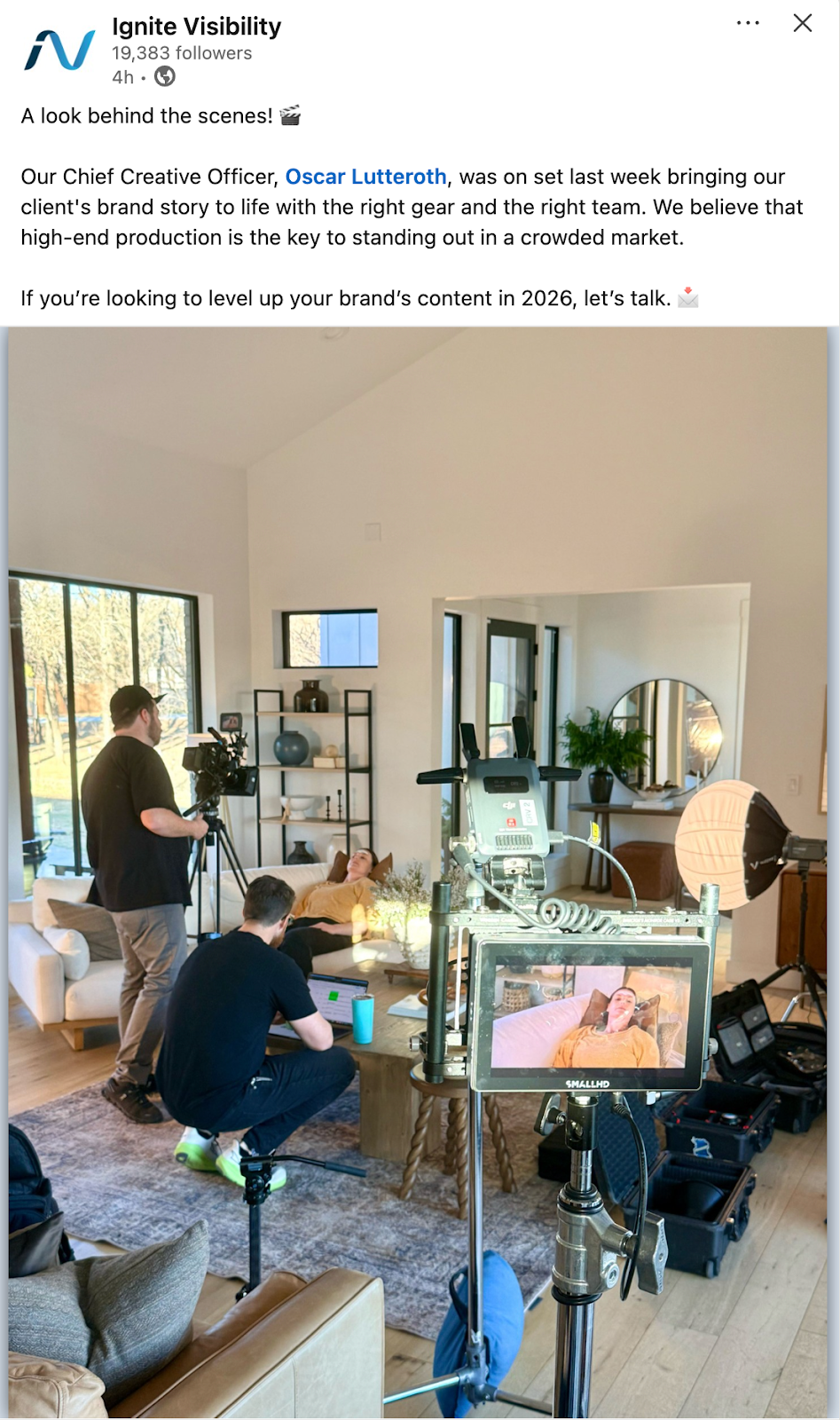
Behind-the-scenes content builds authenticity and helps followers feel more connected to your brand. It also requires minimal planning. Just grab your phone and capture real moments as they happen. Always check permissions first, and keep any private customer information out of the shot.
6. Introduce a Team Member
Introduce the people who make your business run. Post a quick Q&A with a team member, celebrate a work anniversary, or share what someone loves most about their job. Something like “Meet Alex, our installation lead. Here’s what Alex recommends checking before delivery.” works well. It also gives your audience a reason to read beyond the name and smile.
Team spotlights humanize your brand and remind customers that real people are behind every interaction. Plus, these posts are easy to plan and always perform well.
7. Share a Customer Story
Nothing builds trust like real customer experiences. Share a glowing review, highlight a success story, or repost a customer’s photo of your product or service.
Testimonials act as social proof and help new customers feel confident choosing your business. Always ask permission before sharing customer content, and give credit where it’s due.
8. Explain a Before-and-After Project
A transformation photo gets attention, but it doesn’t tell the whole story. When using it as social media content, explain the scope of the project and how long it took. This will give visitors a baseline to understand what went into getting that result.
If you’re wondering how to make your social media posts more appealing in general, adding conext to a strong visual is a great place to start. Avoid presenting an exceptional outcome as the form, and note when results may vary.
9. Ask a Relevant Question
Generic conversation starts don’t tell you much about your customers. Instead, ask questions tied to your business. Some good ideas include things like:
- Which topic should our technician explain next?
- What questions do you have about our latest project?
- What are you excited to snag in store this Black Friday?
- What’s your favorite way to use [product]?
Tell your audience how their answers will shape your next decision. That gives them a reason to reply and feedback you can act on. It’s a win-win for everyone!
10. Run a Useful Poll
The best ideas for social media posts of this type help you make a real decision, such as “What class time would you use?” Keep the options short and explain what you’ll do with the results.
Treat votes and comments as audience feedback. They don’t guarantee reach or sales, so use them to learn what your customers want.
Interactive content is quick to create and easy for people to engage with, boosting your engagement KPIs and keeping your page active in the algorithm.
11. Feature Customer-Created Content
When a customer posts about your business, ask permission before reusing it. Make sure their permission covers how you plan to use the content, such as in a feed post or in an ad. Most importantly, always credit the creator.
Customer-created content, or user-generated content (UGC), shows real people using your product or service. It provides social proof you can’t buy and saves you the time and money you’d spend creating your own content.
12. Connect with a Relevant Seasonal Moment
The best content ideas for social media tie a season or holiday into something useful for your business. Pair the occasion with a helpful tip, a relevant offer, or a local event. You can jump on trending sounds or other social media trends, but only if they relate to your business. Skip the ones that don’t apply.
If you plan to use music, check the rights first. Different social media platforms treat trending sounds differently. The one you’re dying to use might not be cleared for commercial use.
13. Highlight a Local Partner
Businesses on social media thrive when they lean into their local roots. Highlighting a partnership with another local business is the perfect time to explain a shared experience, a referral relationship, or a joint initiative. Don’t just mention that this partnership exists. Instead, tell followers how it actually benefits them.
Be very clear about the nature of the relationship. If the partner is a sponsor, don’t present the post as an independent recommendation. Always be clear about what is sponsored content and what isn’t.
14. Cover a Community Event
Community events are perfect when you’re wondering how to create engaging social media content. An event post should include the location, date, and participation details so people know exactly how to join. Try something like “Visiting Saturday’s farmers market? Here’s how to find our booth!”
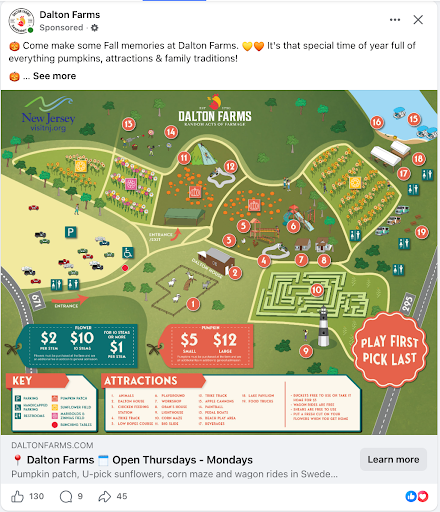
Community-focused content strengthens your local presence and shows that you care about more than just sales. It also encourages shares from other businesses and community members.
After the event, share follow-up photos to show who showed up and what happened. That gives people who missed it a reason to come next time.
15. Give a Location Tour
A location tour answers the questions first-time visitors have before they arrive. Show parking, entrances, accessibility information, facilities, or what a visit looks like from the front door.
Skip the promotional tone here. Keep it genuinely helpful. A short walkthrough can make a new customer feel more comfortable about walking through your doors for the first time.
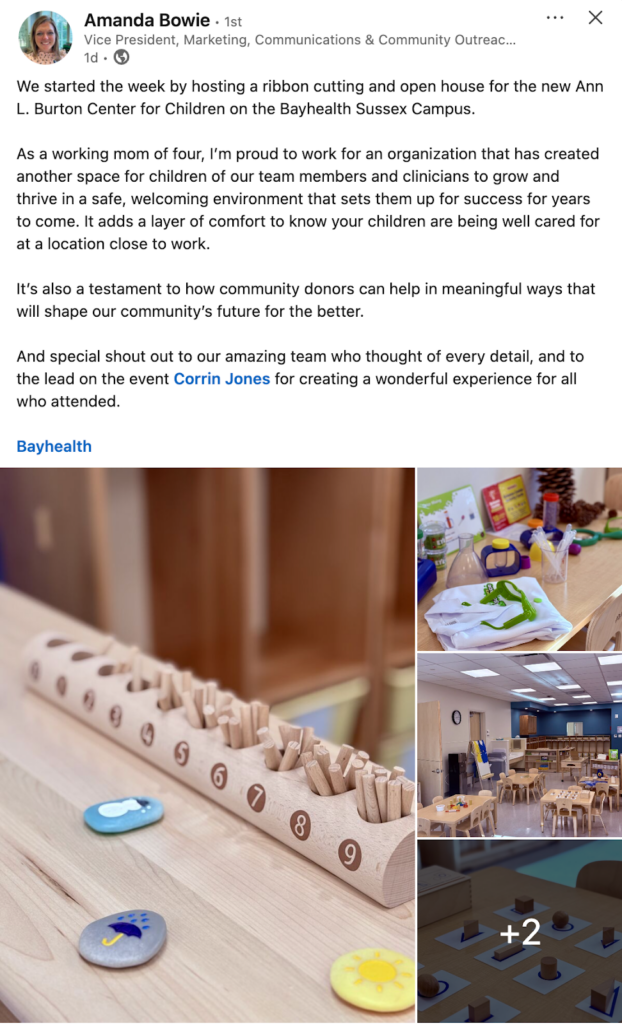
16. Share Advice From a Local Employee
Sharing your employees is a great way to stop the scroll. In a short-form video, ask a team member to answer a question that regularly comes up at their store. Local expertise specifically makes these social media post ideas feel useful and specific to each location’s community.
You can also empower employees to share brand content from their own profiles. Keep personal-profile advocacy voluntary, but provide ready-to-share posts that employees can add their own voice to. Employee advocacy extends your reach, adds authenticity, and turns your team into brand ambassadors.
When employees endorse the business, make sure they explain their employment connection. Their profile alone might not make it clear to everyone who sees the post, but your audience should understand that the person posting is an employee of the business.
17. Explain a Specific Offer
Social media is a great place to announce limited-time deals, new product launches, or exclusive discounts. Keep promotional posts clear and action-oriented: tell people exactly what the offer is and how to claim it.

Replace vague urgency with accurate dates or availability. Not every business benefits from advertising discounts or sales, so make sure you lead with why the offer is beneficial to your audience.
18. Introduce a New Product or Service
A launch post should explain who the new offering helps and how people can access it. Lead with the problem it solves before you describe the features.
Include the next step, whether that’s booking, ordering, or visiting a location. If the product or service isn’t available at every location, make that very clear in your posts.
19. Share Availability or Service Updates
Practical updates, like changed hours, appointment openings, seasonal schedules, or delivery deadlines, are social media post ideas that customers actually need. They save people a trip or a phone call by sharing what they need to know.
Keep time-sensitive information current by updating or removing outdated posts. A clear, accurate update builds trust.
20. Help Customers Compare Options
Comparison posts answer the question “Which option suits which needs?” Use clear criteria, like budget, timeline, or space, to guide your audience to a choice.
Avoid unsupported claims that one option is better than another. Helping customers choose the right option matters more than simply declaring yourself the best.
How to Adapt These Ideas Across Multiple Locations
Social media content ideas work best for multi-location brands when corporate sets the message and each individual location makes it local.
Take a seasonal-maintance post for example. Corporate supplies the same content calendar to every location. It’s the same message, but then each location can go in and add its own technician photo, local conditions, service availability, and booking link.
The key to make this work is to know what stays the same and what can change. Brand claims, terms, and visual standards should always follow the same brand guidelines. But aspects like photos, local details, availability, and booking links can change depending on the local team.
Building a Simple Corporate-to-Local Publishing Workflow
A repeatable process will keep every location on track without slowing anyone down.
Here is a simple workflow you can follow to keep everything organized and consistent:
- Brief: Corporate shares the goal, audience, and key message.
- Approved assets: Corporate provides the copy, templates, and visuals that locations can use.
- Local details: Each location collects its own photos and adds availability and booking links.
- Review: Corporate checks offers and terms, and a designed approver signs off on local edits.
- Scheduling: Approved posts are scheduled on the calendar.
- Reporting: The team reviews results, and each location responds to customer comments and messages.
Here’s a pro tip: Put a name next to each task. Understanding who is responsible for what will make your social media publishing process much more efficient. For example, local teams usually collect the photos and answer customers, while corporate or a regional team checks offers and approves edits.
Choose a Format That Fits the Idea and Platform
No particular content format belongs to just one type of post. Short-form video is a good example because it can deliver a demonstration, introduce your team, or answer a customer question.
The key is to take your social media content ideas and then choose the format that shows them best on the platform where your audience is.
Whether you decide to post a video, a carousel, or a static image post, make it easy to understand without sound. A lot of people scroll social media with their phones on silent. Adding captions to your videos, keeping on-screen text large enough to read on a phone, and writing descriptive alt-text for images will make your content accessible to everyone.
No single length or style performs best everywhere, so don’t be afraid to play with your content and test your audience. Publishing options also vary by platform and tool, so always check what format is available on your chosen channel before creating the content.
Turn an Idea into a Caption
Once you’ve chosen the idea and the format, the caption has to do the rest of the work. A simple structure keeps it focused:
- A specific opening
- A useful detail
- Evidence, social proof, or local context
- A next step or call-to-action
Here’s a formula to follow: Visiting our [location] studio for the first time? Arrive [verified preparation detail]. Here’s what your session includes: [details]. Ready to book? View available appointments at [link].
Treat this as a template, not a script. Replace each bracket with real details, and adjust the wording to match your brand voice. Remember, the goal of social media is to make you stand out and you can’t do that if you sound like everyone else.
A Two-Week Social Media Content Calendar
A calendar turns a list of ideas into a solid plan. Let’s take a look at an example of a hypothetical two-week social media content calendar.
|
Week |
Post |
Owner |
Asset |
Platform |
Location |
Approval Status |
Intended Outcome |
|
1 |
FAQ |
Location manager |
Captioned video |
Instagram, Facebook |
Downtown |
Scheduled |
Engagement |
|
1 |
Team Intro |
Location manager |
Photo with tip |
|
Westside |
Approved |
Local connection |
|
1 |
Offer |
Corporate marketing |
Graphic with link |
Facebook, Instagram |
All Locations |
Terms check needed |
Tracked visits to page |
|
2 |
Demo |
Technician |
Short Video |
|
Downtown |
Draft |
Fewer pre-visit questions |
|
2 |
Customer story |
Marketing coordinator |
Text and photo |
Facebook, Instagram |
Westside |
Awaiting permission |
Inquires |
|
2 |
Community update |
Location manager |
Event photos |
|
Northside |
Scheduled |
Local engagement |
Naming the owner, approval status, and intended outcome will help keep your team accountable to the plan. You can adjust the content calendar by adding or removing other columns to fit your workflow and business goals.
Repurpose Content Without Repeating the Same Post
You don’t need to reinvent the wheel every time you post. One strong idea can fuel multiple posts across different platforms.
Here’s one sequence from a single customer question:
- Customer question: A customer asks how often to schedule maintenance.
- Instructional video: A technician answers the question on camera.
- Illustrated checklist: A carousel turns the answer into steps
- Follow-up answer: A text post addresses the replies and questions the first post generated
You can also repurpose similar ideas into different types of content. For example, a Reel suits Instagram, while a checklist with the same information may work better on LinkedIn or Facebook.
Use AI to Develop Drafts from Real Business Impacts
AI can help you get past a blank page, as long as you give it real information to work with. Try a prompt like this:
Create three [platform] post drafts for [business/location] answering [customer question.] Use only these verified facts: [list facts]. Follow this tone: [guidelines]. Suggest one relevant next step.
Tools like Rallio’s AI Content Creation ideas tool can then turn that prompt or uploaded image into multiple caption options. They can also include brand controls so your posts will stay consistent across locations.
A big disclaimer here: use AI tools to speed up drafting, but always review the final output before posting. Assign a human team member to check claims, dates, local details, and permissions before scheduling the final version.
Measure Which Post Ideas Work for Your Business
As you’re putting in all this work, make sure to measure each post against the purpose you gave it. A post meant to build awareness should be judged differently than one meant to start a conversation or drive a booking.
Here are some social media KPIs to consider:
- If your goal is awareness, track reach.
- If your goal is conversation, take note of substantive responses, not just reactions.
- If your goal is consideration, track visits and inquiries.
- If your goal is conversion, take note of bookings or purchases.
Engagement alone doesn’t show revenue impact. While likes and comments are useful in their own right, they don’t tell you whether anyone becomes a customer.
How Rallio Helps Small Businesses Succeed on Social Media
Good ideas only help if they actually end up reaching your feed. Whether you’re running one location or one hundred, Rallio supports an interactive workflow from the first draft to the final report.
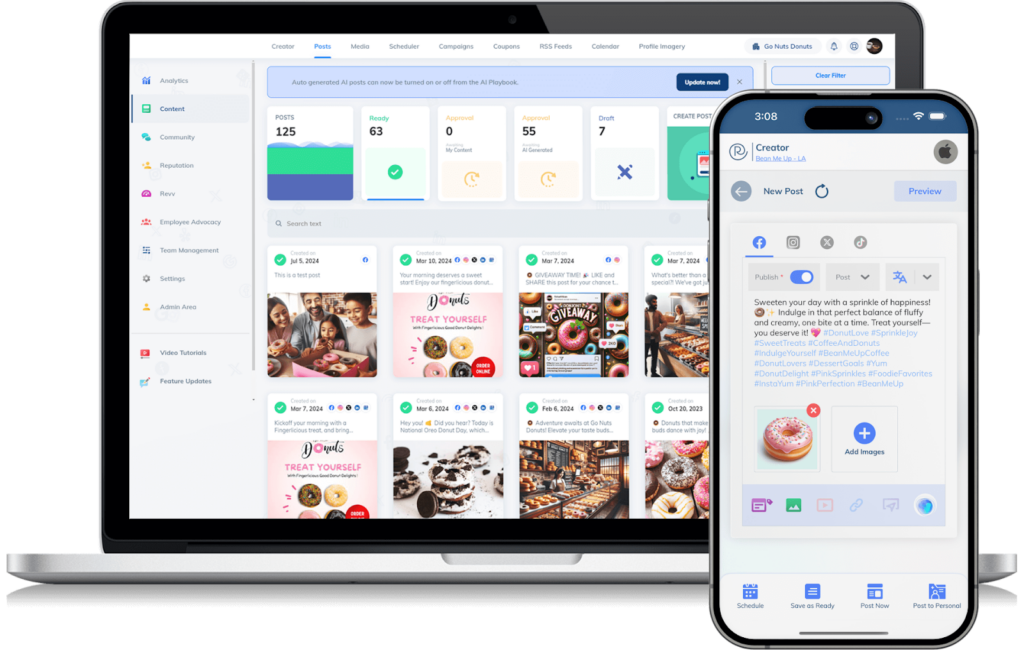
- Draft and localize: Use Rallio’s AI-powered content creation tools to turn a prompt into caption options, then add local details to each location.
- Apply brand controls: Set guardrails so every post stays consistent with your brand.
- Schedule approved posts: Put approved content on the calendar with the help of the social media scheduler.
- Review location-level performance: Use Rallio’s social media analytics to view results for each location or roll them up into one report.
Following these four steps each week turns a list of great social media content ideas to post into a routine your team can repeat.
FAQs
1. How do businesses come up with consistent social media post ideas?
Start by listening to customer questions, tracking industry trends, and reviewing past performance. Use a content calendar to plan themes in advance. Mix evergreen content with timely posts. Tools like Rallio help automate ideation and scheduling so you’re never starting from scratch.
2. What should a business post when it has no new announcements?
When you don’t have any particular announcements, you need content ideas to post that don’t depend on news to keep your feed useful between launches. Share content that answers real customer questions, such as an FAQ, a short demonstration, or common mistakes to avoid. You can also show behind-the-scenes work, introduce a team member, or highlight a customer story.
3. How many different post ideas should a business rotate through?
Post as many ideas as your team has capacity for. Mix promotional, educational, and engagement-focused content. A solid rotation keeps your feed fresh while making planning easier and more sustainable.
4. Should social media post ideas change by platform?
Yes, you should adjust your posts for each platform, but always keep your brand voice and messaging consistent. Instagram favors visuals and Stories. LinkedIn works well for thought leadership. Facebook supports longer community posts.
5. How do businesses know which post ideas are working?
You’ll know which posts are working by monitoring engagement metrics like likes, comments, shares, and saves. Make it easier by using platform analytics or tools like Rallio to identify top performers.
6. What can I publish without filming myself?
Plenty of content creation ideas work without going in front of the camera! Try an infographic, a text-and-photo post, a customer story, a poll, or a product close-up.
7. How often should a small business post?
There is no single ideal posting frequency. Choose a pace your team can maintain and keep steady. Quality and consistency matter more than a high volume of posts that don’t really say anything.
8. Can multiple locations use the same content?
Yes, as long as each location adds its own details. Corporate can provide the brand guidelines, but each location can customize them.
9. How do I measure whether posts generate business?
Match each metric to the post’s purpose, such as tracked visits, inquiries, bookings, or purchases. Engagement alone doesn’t show revenue impact, so don’t rely on likes or comments. Compare similar posts over consistent periods, and account for paid promotions, audience sizes, and location differences. You can also use tracking links or booking sources wherever permitted.
10. Can AI help generate social media ideas?
Yes, AI can help you get past a blank page by drafting post ideas and captions. Review every claim, date, local detail, and permission before you hit publish,
Choose Three Ideas and Start a Repeatable Routine with Rallio
You don’t need a long list of ideas to get moving. Pick three that fit your audience and goals. Then collect the assets each one needs, like photos or customer permissions.
Assign an owner to each post and set a publish date. After the posts go live, review the outcomes against the purpose you had set. Use what you learn to choose your next posts. That’s how a handful of social media content ideas becomes a process your team can repeat.
Need help organizing content across locations? Book a Rallio demo to explore drafting, approvals, scheduling, and reporting today!

Joe Kennedy is a Social Media Specialist at Rallio | Powered by Ignite Visibility with over seven years of experience helping brands and franchises build strong, engaged online communities.
With a degree in Sociology from the University of California, Santa Barbara, he brings a unique perspective to social media, connecting insights about human behavior to digital engagement strategies. Joe has worked extensively with franchises, developing social media publishing plans that balance brand consistency with local relevance, driving both engagement and measurable business results.
Passionate about the intersection of sociology and social media, he leverages data, trends, and audience insights to help clients create authentic connections and grow their presence across platforms.